I have completed item 150 of my 100 item porting plan. There are no features left to port. There are some features that did get cut, because, mostly because they just didn’t work across all three platforms without potentially crazy effort. And while text to speech was cool in 2009 when I wrote the thing initially, because those robotic voices were oh so sexy, I just don’t think it’s worth the effort these days.
Of course, if that was your favorite feature, let me know, and I’ll take a stab at adding it.
Until then, just testing and bug-fixing (hopefully not too many) remaining before I release this thing into the wild.
If you want in on testing out, get in touch. It’s going to be free in the end, but I’m not going to put it out completely broken if I can help it.
I just wanted to barge in here and let you know that the rewrite of StoryBox is proceeding as planned, though there was a little delay in the middle of august that stretched nearly until the end of September. I got covid (on my wedding anniversary), that took me out for about 10 days, and then I lost all momentum for awhile.
Life’s rough.
Still, back on track, now. You can write in it, you can arrange your documents, you can export them. You COULD write a whole novel in it right now and export it to epub and hand it off to Amazon.
But there’s still more to do. I have a list of roughly 83 remaining items to take care of before all of the features are done. It’s not as big as it sounds, as some of them are really small. The major things are all sketched out at the moment.
Some of them even get upgrades! StoryBox 2 could only import from txt and rtf files. The new StoryBox will import txt, as before, but also docx, odt, and markdown (md). Rtf has been cut, but mostly because it’s a pretty solidly dead format at this point. StoryBox exports will now export all of the same types that it imports, as well as epub 3, which replaces the epub 2 that StoryBox 2 exported. There are also quite a few “fixes” that I’ve discovered that I didn’t even know existed. I’m sure the new StoryBox will have its own issues, but I’m doing my best to eliminate them where they can be eliminated.
There’s no timeline yet for a general release, but, since it’s free, if you want an early look, just email me. My first name at my website’s name.
Now, for the other news.
For similar reasons as StoryBox, Derelict will also be getting the cross platform treatment. Though, it started life as C++, and has already been cross platform once, so making it so again is far less effort than having to rewrite the whole thing. Push a little here, shove a little there, and you have a shiny new version of Derelict that will run on Linux and Mac, as well as windows. It’s also getting some upgrades, like better controller support, the ability to resize the window without having to make it full screen, and, again, some bug fixes that have existed since 2004 that I wasn’t aware existed.
I don’t have a date for this either (the link above only has the currently available version for Windows), though it’ll probably be sooner than StoryBox, since it’s nearly complete.
There’s a new era for StoryBox on the horizon. Surprisingly, it’s something I thought I’d never do, on multiple fronts, yet here we are.
What the hell are you talking about?
I switched to using Linux about two months back. I got fed up with all the crap that Microsoft is shoveling these days – bad updates, shoving ai in places where it doesn’t belong, ads in your operating system that you PAID for, tracking you across the internet, no matter what services and settings you change (yes – this is a new one – search out Windows GDID).
So I switched, and I’m never going back. My experience with Linux, so far, has been pretty much better in every way. It boots faster, apps start up faster, it doesn’t force updates on me, ever (I’ve had my windows machine reboot on me when I’m in the middle of working on something to do an update – no way to stop it).
You might ask, “Why not Apple?” The answer is simple. I don’t want to afford Apple products. They’re not expandable or upgradeable, and they sunset them far too early. I had a Macbook Pro once, that suddenly couldn’t get new OS versions, and it was only four years old. They just decided, “Nope. We want you to shell out more money.” I’m also not a fan of the OS. And have you seen the latest UI changes in the latest version of the OS? Those huge rounded corners are so space wasting and fugly, it’s impressive.
And that is why I chose Linux.
But what in the name of word count does that have to do with StoryBox?
I’ve been asked in the past if there would ever be a Mac version of StoryBox, and I always had to answer with a big “No”. It’s written in C#, and uses a UI library that is not available on the Mac. So, essentially, it was impossible.
Until I decided to switch to Linux, and discovered that the writing app landscape on Linux is in dire need of better software. You *can* get Scrivener working on Linux under Wine (which is this software that can make Windows apps work on Linux – but not all of them), but native options are few and far between, and none of them are what I would call first rate pieces of software.
I’m not talking about office style writing software – the word processor that comes with Libre Office, for instance, works great for general writing tasks, but for writing a novel in the way that StoryBox does? There are apps. They aren’t for me.
So I decided on taking a stab at porting StoryBox to Linux. However, I kind of hate straight porting, and I wanted a challenge, so I decided to not only port it to Linux, but also have versions for Apple and Windows. In addition, I chose to do it the hard way: I switched languages.
One of the things that always bugged me about StoryBox, and it’s C# underpinnings, was how long it would take to open. On my super fast machine (fastest I could get last September before the ram apocalypse ruined everything), it still takes multiple seconds even for the splash screen to show up (at least, on first load). You could also see it chug loading some of the UI, which I always kind of thought was terrible. I don’t want to see those things. It had lots of features, but it didn’t feel as zippy as I’d have liked.
Which led me to this: I’m rebuilding StoryBox in C++. From the ground up. And from the start, it runs on all Windows, Linux, and macOS. The best part? So far, startup is instant. It takes practically no time between clicking the icon to start it and the moment it appears on your screen. It’s amazing. Splash screen to hide the loading? Who needs it? Project loading? It’s near instant. It just feels so responsive in a way that the original never did. I put a million words into a single document (not how I envision anyone using StoryBox, to be honest), started typing, and did not feel any lag to speak of, despite counting the words with every keystroke. At 1.6m words, though, yeah, a little laggy.
This version of StoryBox will be backward compatible with the most recent version of StoryBox 2. All of your old files will open in the new version of StoryBox. If you don’t have the latest version of the older software, you will need to get it, just long enough to open your projects in it. It’s also currently available free on StoryBoxSoftware.com.
You won’t be able to switch a project back, though due to the internal format of the text changing. Previously, it was rtf, but the new editor component doesn’t support rtf, so it will be the version of html that it supports, which, of course, the old StoryBox won’t understand. So, back up your projects if you make the switch.
And now, the most important part of this post. The explanation of the title of this whole thing.
StoryBox, the new StoryBox, will just be called StoryBox.
Wait. That’s not it. What is it?
Oh.
Oh yeah.
StoryBox will be free. Free to use. Free to copy the source and build it yourself. Free and open source, and as liberally licensed as I am able to make it. I don’t think most writers care about the open source part, but, the price? It’ll be priced just right.
Why, though? Why make it free?
I just DON’T want to run it as a business, anymore. I don’t want to deal with having a store front. I don’t want to deal with having to do tech support on a basis where I feel obligated. I never made enough money on StoryBox to support a living. Not even close.
I’m doing this, because I want to see StoryBox out there, and I want to see it used, because I think it’s better than any of the other pieces of novel writing software I’ve tried, even Scrivener.
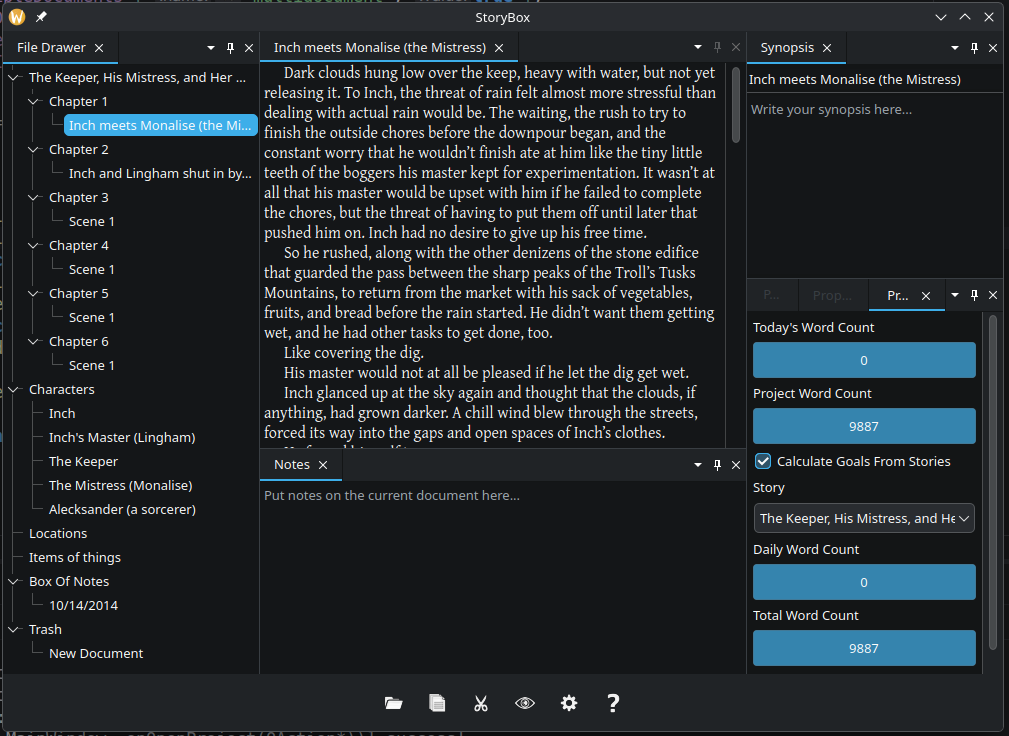
There’s no date set, yet. But I do have a screenshot:
StoryBox started back in 2009 as a “how hard would it be to do this?” kind of project. It didn’t take as long as I thought, but at the same time, it took far longer than I imagined.
StoryBox 2, though, was where it really became the piece of software that I really was kind of proud of. It did a lot of things that other pieces of well known writing software did, but it did some things differently.
I never added as you type spell checking, as I believe it breaks the writing flow. I also limited how flexible the formatting should be, as the app was about writing, not about making things pretty.
I moved the menu/toolbar to the bottom of the screen, for two reasons. The first was to put it close to you when you were on a laptop and were using a touch screen, but also to put it in an area of the screen we’re all used to ignoring.
It failed, though, in other ways. The first of which is that it really kind of failed to gain traction like I hoped. The week I released it, those Scrivener guys announced they were bringing Scrivener to the Windows platform. It was written in C#, which required a download of a .Net runtime for many people, at the time, which also kind of put a damper on things, I suspect. It also made it nearly impossible to port to other platforms due to the UI library I chose to use.
And, so it sat since 2016 without another update. In 2022, I took down the sales page. It still works, and you can still download it, but you could only use it for 45 non-consecutive days, and then it’s over.
Wow, I just did the math. it’s been 10 years since I released an update. Crazy. I DID make some changes that never got released. Things got in the way, new features didn’t get completed, that sort of thing. One of the changes was to the full screen mode. I wanted it to have a faster switch between modes, but I never quite got it to where it wasn’t a little buggy. Usable, but was missing features the previous version had.
So. Why am I going back through all this?
I’ve put a key on the website. You can now download the last version of StoryBox, use that key to register it, and use StoryBox for free, for as long as you want, or until Windows breaks it.
It is just, I hope, a first step. I want to release it as open source, but that UI library I mentioned makes that impossible.
Stay tuned to this space for more information coming later this summer (probably), and I’d love to tell you what it is right now, but this is not the space for that. Not yet.
Today, I finished up porting over all the importers for TrackerBox Mac. I start on the interface on Monday. There were a lot more of them than I remembered (Amazon KDP has 9 importers all by itself), and a few of them required some very specific support code.
In my afternoons (after busting away at TrackerBox in the mornings), I’ve slowly been working on getting a new novella ready for publication. Making Up Lost Time is the first of what I hope to be multiple stories published this year. I know I’ve teased this shit in the past, over and over, but I really have some hope that I’m coming out of this long slow period. I won’t be spoiling what I’m planning to work on, or how much I hope to get done, but I can assure you, it’ll be more than I got done last year (at least when it comes to writing).
As I write this, there are 72 hours left in the TrackerBox Mac Kickstarter, and it’s just shy of $9500 in total funding. I am continually amazed and humbled at all of your help. Please keep helping spread the word, though. This is the last time you’ll be able to get TrackerBox for $75, and it’s also your only opportunity to get in on the beta for the Mac version.
Now, on to the meat of this post.
I learned today that FogBugz is getting rebranded as something called Manuscript. I also learned that the free tier I’ve been using to have the form in the app you can fill out when you have a problem will be going away. There’s no information about it on their new site, and the pricing doesn’t make sense for me. It’s not expensive, exactly, but as the only user of the system, it doesn’t bring me enough value at that price point.
So I’ll be trying a few other things to see how they work while I wait to get definitive word on whether the solution I already have is actually going away. At the moment, I’m hoping that it sticks around long enough that I can finish TrackerBox Mac before having to tackle the problem directly.