Category Archives: Software

StoryBox Update #1

I’m probably going to do these every couple of days for awhile, “these” being updates on StoryBox, as I just have to tell someone about it (someone besides Wendy – I bore her to tears with my chattering about my current projects sometimes), so you get to receive the end result of my constant need to chatter.

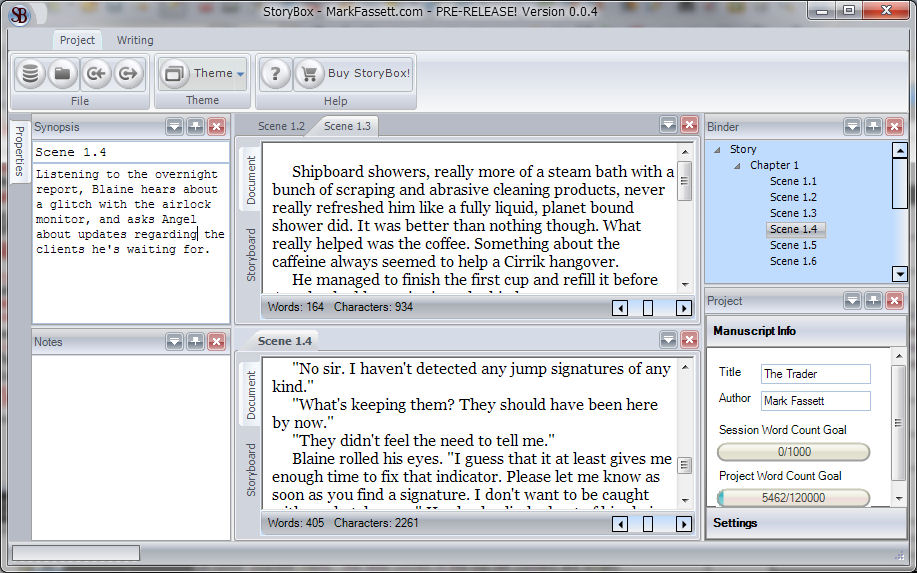
Over the weekend, I added mostly necessary features. You can now import from a text file (meaning you can get your current WIP into StoryBox) and export out to a textfile (meaning you can get your work OUT of StoryBox). End to end, you could actually use it to produce a project now. I added a “Help” button, window position persistance which means you can close or hide any of the information windows and it will remember where they were after restarting the app. There’s a way to toggle multiple documents on and off, so if you don’t like a bunch of tabs across the top of your window, you don’t have to have them. There are now Session and Project word count goals and progress bars. You can watch them grow while you type, which is pretty cool.

I still need to hook up a couple other interface elements, and there are a couple of different views that need to be implemented, but I’m pretty pleased with the progress. I can’t guarantee a time frame, as I still have to do other work, but if progress continues to be steady, I wouldn’t be surprised if there was a pre-sale sooner rather than later.

StoryBox

In my “copious” spare time, I’ve been working on this little app designed for writers of novels. It’s more than loosely based on Scrivener, which I’ve come to love, and would use without spending the time to write my own were it not for one thing. Scrivener is only available on OS X. Yes, I have OS X, but it’s only on one machine, a MacBook Pro (which I love), and I can’t use it on any of my others like my desktop with the nice keyboard and comfy chair, or my tiny little Toshiba Netbook.

I tried out several other programs on the PC, none of which were for me. Liquid Binder is nice looking, but convoluted and not really suited to the way I want to work. yWriter seems OK, but it’s not oriented around the manuscript that you are writing. The manuscript window has no more importance than any of the other tabs, and it sits at the bottom of the window and is uncomfortable to work in. The other software I’ve found has also been unsuitable, for other reasons – restrictive workflow, clunky interfaces, and just plain ugly.

So, I started work on StoryBox, and I’ve been far too obsessed with it for my own good. At some point, I will make StoryBox available to the rest of the world at a fair price. I would be tempted to make it “donation” ware so that I’m not enjoined to update it all the time, but for the fact that, in order to make it behave the way I wanted and to have certain up to date UI features, I’ve had to purchase some third party components, and they’re not cheap, and I’m not likely to use them for any other project.

I have NO idea how many people are looking for this product, though I know there are at least a few. I’m mostly making this for me, and I’m not trying to clone Scrivener exactly. Scrivener just happens to have a workflow, or at least, allows a workflow, that is very close to the way I want to write, and I’m really just building StoryBox so that it allows my workflow.

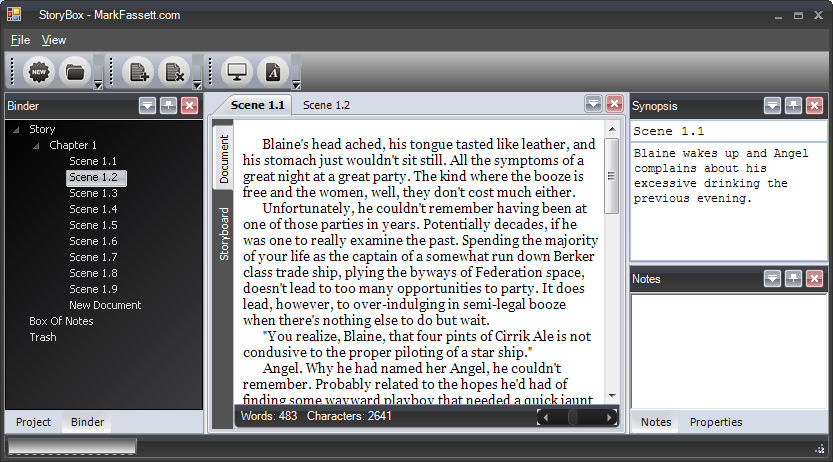
I hope to have a beta before NaNoWriMo in November, but we’ll see how that goes. Right now, you can enter text into it, you can import an existing novel if it’s in plain text format (with some basic tags for chapter and scene breaks), but you can’t get text back out of it. 🙂 It’s got a full screen edit mode, and a synopsis and notes for each document. It counts words as your typing, but it doesn’t yet keep track of words across the whole project. There’s lots of work left to do.

Storybox Screenshot